Sales Ops: 2–4 Week AI Lead Response Pilot That Keeps Your CRM

AI for lead response works: it delivers instant first-touch replies, applies a consistent qualification script, and routes qualified leads to the right rep before interest cools. Vendors like Zapier build automation patterns around this exact gap, and platforms like RevRing package it into industry playbooks. The metric that matters most is response time.
TL;DR:
- Response time is critical, with AI systems capable of replying within seconds to every lead channel, significantly reducing the opportunity for interest to cool.
- Automated qualification scripts ensure consistency and data accuracy, capturing structured information and updating CRMs in real time.
- Proper integration, deduplication, and routing rules are essential to avoid conflicting outreach and ensure compliance, especially in regulated industries.
- Pilot projects should start with a few high-volume channels, maintain owner oversight, and gradually expand once error rates and qualification accuracy are proven.
- Compliance measures like consent tracking, TCPA rules, and secure data handling are vital to prevent regulatory risks and preserve lead trust.
Table of Contents
- What Does an AI Lead Response System Actually Do?
- How Much Faster Is AI Lead Response, and What Does It Actually Improve?
- Connecting AI Lead Response to Your CRM and Data Stack
- Your AI Lead Response Implementation Checklist
- Deployment Timeline, Team Roles, and What It Costs
- Measuring Success: The KPIs That Prove ROI
- Security and Data Privacy in AI Lead Response
- The AI Technologies Actually Doing the Work
- Where AI Lead Response Falls Short
- Keeping the Human Touch in an Automated Process
- What Successful Rollouts Look Like in Practice
- Compliance Rules That Change by Industry
- The Real Gap Between AI Hype and What Actually Works
- Bring RevRing’s Playbook Into Your Own Pipeline
- Sources
- FAQ
What Does an AI Lead Response System Actually Do?
An AI lead response system catches a lead the moment it lands, replies instantly, and starts qualifying before a human ever sees the record. It works across every channel where leads actually show up:
- Web forms — instant confirmation and follow-up questions triggered on submit
- Ad lead forms — Meta and Google lead ads synced directly into the response flow
- Chat — website widgets that qualify visitors in real time
- SMS — two-way texting that feels conversational, not automated
- Phone — AI-assisted call handling or instant callback triggers
- Social lead forms — native lead gen units routed the same way as web traffic.
The core functions matter more than the channel count. A working system sends an instant reply, runs a qualification script (budget, timeline, intent), routes the lead to the right owner or queue, enriches the record with firmographic or behavioral data, writes results back to the CRM, and logs every touch for the next person who picks up the thread.
Continuity is what separates a real system from a chatbot bolted onto a form. Shared inboxes preserve conversation history so no rep starts cold, and deduplication logic keeps the same lead from triggering three different outreach sequences because it hit three different channels. Consent tracking rides along with every record, which matters the moment you scale past a handful of leads a day.
How Much Faster Is AI Lead Response, and What Does It Actually Improve?
Speed is the headline, but it’s not the only number that matters. Human teams typically take minutes to hours to respond to a new lead, especially outside business hours or during a busy sales day. Automated systems that reply instantly across channels can cut that gap to seconds and hold it there 24 hours a day.
The speed math: A lead that sits untouched for an hour is fundamentally different from the same lead 60 seconds after submission. Fast first response consistently correlates with higher contact and conversion rates across the automation research this article draws on, even before you count the operational savings.
Three gains show up almost immediately after a pilot goes live:
- 24/7 coverage without adding night or weekend staff
- Fewer dropped leads, since nothing sits in an inbox waiting for someone to notice it
- More consistent qualification, because the script doesn’t have a bad day or skip a question when the queue is long
There’s a quieter benefit too: data quality. AI-driven intake captures structured fields, urgency, and service need, then writes that data back to the CRM in a consistent format. That means cleaner pipeline reporting and fewer “unknown” fields dragging down your forecast accuracy. Check speed-to-lead benchmarks against your own numbers before you set pilot targets.
Connecting AI Lead Response to Your CRM and Data Stack
The integration layer decides whether your AI response system becomes infrastructure or just another disconnected tool. Three patterns cover most stacks:
- Webhooks that fire the instant a lead hits a form, ad platform, or landing page
- Zapier-style automations that connect lead sources to your CRM and messaging tools without custom code
- Native CRM connectors and API calls for teams that need tighter control over field mapping and record ownership
Enrichment should happen automatically, not as a manual cleanup task. The moment a lead enters your stack, the system should look up missing details and push structured results into CRM fields, the same logic CRM enrichment tools use to time follow-up around actual engagement instead of a fixed schedule. Deduplication has to happen at intake, before routing runs. Enforce a single lead ID across every source, because a lead that hits your form and your Facebook lead ad on the same day will otherwise generate two conflicting outreach sequences from two different reps.
Routing rules decide what happens next: round robin for even distribution, skill-based routing when certain reps handle certain lead types, or ping-post logic for teams selling leads to multiple buyers. Whatever rule you pick, context has to travel with the handoff. A rep who opens a “qualified lead” record with no notes on what the AI already asked is starting from zero.
Pro Tip: Map your dedupe key before you connect a single integration. Retrofitting a lead ID strategy after duplicate sequences have already gone out is far harder than setting it up first.
Your AI Lead Response Implementation Checklist
Running a pilot without a plan is how teams end up with a chatbot nobody trusts. Follow this sequence instead:
- Scope your lead sources. List every channel generating leads today, then pick two or three for the pilot. Define the qualification fields you actually need (budget, timeline, intent, service type) before writing a single script.
- Configure the qualification script. Set the tone (formal for legal and healthcare, conversational for real estate and retail), define escalation triggers (specific keywords, high-value indicators, angry sentiment), and map every field back to your CRM schema.
- Test on a small sample. Run the pilot on a limited lead volume first. Validate that handoffs carry full context and measure how often the AI misclassifies a lead or triggers the wrong sequence.
- Scale deliberately. Once error rates are acceptable, add volume, then add channels one at a time. Lock in routing rules and compliance checks before you open the floodgates.
- Assign ownership. Someone owns monitoring, someone owns QA on qualification accuracy, and someone owns iterating on the script as lead patterns shift.
Pro Tip: Start with a conservative qualification script that flags more leads for human review than you think you need. It’s easier to loosen the logic once you trust the data than to walk back a system that mishandled leads for a month.
Deployment Timeline, Team Roles, and What It Costs
A realistic rollout runs in three phases. Scoping takes about a week: mapping sources, defining fields, and picking pilot channels. Configuration and pilot testing take another two to four weeks, which lines up with the live-in-a-month timelines vendors commonly report for single-channel pilots. Iterating and ramping to full volume typically runs another four to twelve weeks depending on how many channels and compliance layers you’re adding.
Three roles need to be in the room from day one:
- Sales ops or RevOps owns the qualification logic and routing rules
- IT handles the integration work and API connections
- Compliance signs off on regulated fields, consent language, and data handling before anything goes live
Cost tracks three drivers: telephony and messaging volume, seat licensing for the platform itself, and any custom integration work your stack requires beyond standard connectors.
Measuring Success: The KPIs That Prove ROI
Five numbers tell you whether the pilot is working: first response time, contact rate, qualified lead rate, appointments booked, and pipeline value generated from AI-touched leads.
Automated systems can handle hundreds of simultaneous leads without a capacity ceiling, which means volume spikes that would overwhelm a human team become a non-event for a properly configured AI layer.
Track the operational health metrics alongside the revenue numbers:
- Automation handoff rate — how often the AI successfully hands off versus escalating or failing
- False-positive rate — leads misclassified as qualified when they weren’t
- Deliverability and consent checks — message delivery rates and opt-out compliance
Report weekly during the pilot, then move to a monthly cadence once the system stabilizes. Run A/B tests on script wording and follow-up timing. Read why speed-to-lead is the metric to obsess over before you set your first-response target, since the benchmark you pick shapes every other number on the dashboard.
Security and Data Privacy in AI Lead Response
Lead data usually includes contact details, financial indicators, and in regulated industries, health or legal information. That makes your AI response layer a data handling system first and a sales tool second.
Encryption in transit and at rest is table stakes for any platform touching lead records. Beyond that, access controls matter more than most teams realize: not every rep needs visibility into every field an AI captures during qualification, especially in healthcare or legal intake where certain details carry regulatory weight.
Consent tracking has to be built into the automation itself, not handled as an afterthought. That means preserving evidence of opt-in status, respecting time-of-day contact windows, and checking opt-out lists before every automated touch, particularly for SMS and outbound calling where TCPA rules apply. A system that can’t prove consent at the record level is a liability the moment a regulator or a lead files a complaint.
Vendor selection matters here too. Ask any platform how long lead data is retained, whether it’s used to train shared models across customers, and what happens to records when a contract ends. For healthcare intake specifically, confirm whether the vendor will sign a HIPAA business associate agreement. If they won’t, that’s a disqualifying answer, not a negotiation point.
The AI Technologies Actually Doing the Work
“AI for lead response” isn’t one technology. It’s a stack of specific techniques working together, and understanding what each one does helps you evaluate vendor claims instead of taking them at face value.
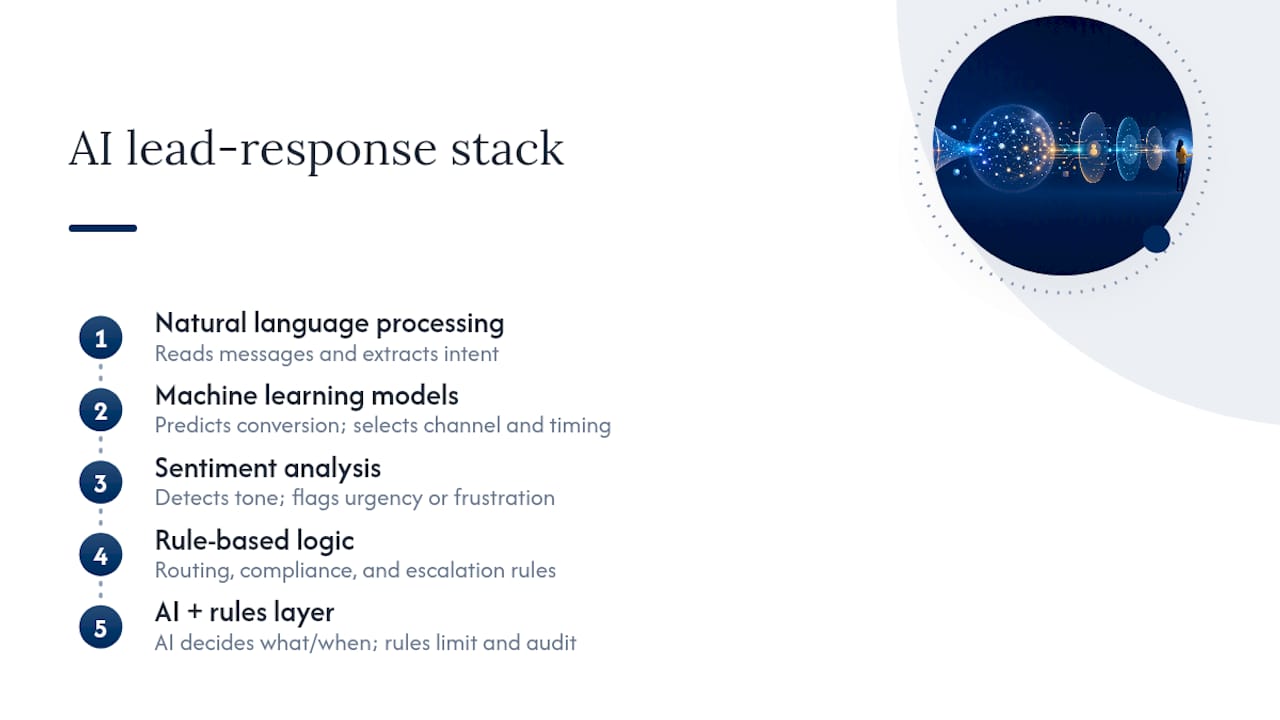
Natural language processing (NLP) reads incoming messages, whether that’s a chat response, an SMS reply, or a voicemail transcript, and extracts intent. It’s what lets a system understand that “not right now, maybe next quarter” means a lead is warm but not ready, rather than a flat no.
Machine learning models handle the pattern recognition side: predicting which leads are likely to convert based on behavior, source, and response patterns from thousands of prior leads. This is also what powers the channel and timing selection that decides whether a lead gets a text at 10 a.m. or a call at 4 p.m.
Sentiment analysis flags tone, catching frustration or urgency in a message so a system can escalate to a human instead of continuing an automated script with someone who’s already annoyed.
Rule-based logic still does heavy lifting underneath the AI layer. Routing rules, compliance checks, and escalation triggers are typically deterministic rules, not machine learning, because regulated industries need predictable, auditable behavior rather than a model’s best guess.
Most platforms blend these. The AI decides what to say and when; the rules decide what’s allowed and where it has to stop.
Where AI Lead Response Falls Short
No AI response system handles everything, and pretending otherwise sets up a failed pilot. A few limitations show up consistently.
Nuance gets missed. Sarcasm, complex objections, and multi-part questions still trip up even strong NLP models. A lead who writes “I already tried something like this and it was a mess” needs a human read on tone that most automated scripts can’t reliably deliver.
Bad data compounds fast. If your CRM has messy fields or duplicate records going in, the AI will enrich and route based on that mess, just faster than a human would have.
Over-automation erodes trust. Leads can tell when every reply feels scripted. A system that never escalates, never varies its language, and never admits it’s automated will eventually cost you conversions with buyers who feel handled rather than helped.
Compliance risk scales with volume. A manual process that makes an occasional consent mistake is a small problem. An automated process making the same mistake at ten times the volume is a much bigger one.
Integration debt is real. A system that isn’t properly connected to your CRM creates a second source of truth, and reconciling two systems is worse than the manual process you were trying to replace.
None of this argues against automation. It argues for treating the rollout with the same rigor you’d apply to any system touching customer data and revenue.
Keeping the Human Touch in an Automated Process
The best AI lead response setups don’t try to replace human selling. They handle the mechanical part of the job so reps spend their time on the part that actually requires judgment.

Treat the AI as the consistent front end that does first-touch qualification and routing, then hands off to a human for the actual selling conversation. That division of labor protects agent time and keeps the deeper relationship-building where it belongs, with a person.
A few practices keep the automation from feeling cold:
- Write scripts in a conversational tone, not a corporate one, and vary the phrasing so leads aren’t getting an identical robotic reply every time
- Build in visible escalation paths so a lead can ask for a human at any point in the conversation, and honor that request immediately
- Disclose that the first response is automated when it’s not obvious. Trying to pass off AI replies as a live person tends to backfire once a lead figures it out
- Give reps full context on the handoff, not just a lead score. A rep who can reference what the AI already learned sounds informed instead of starting the conversation over
Getting this balance right is less about the technology and more about how the script is written and when the handoff triggers. A well-configured system feels responsive. A poorly configured one feels like a wall.
What Successful Rollouts Look Like in Practice
The pattern across successful implementations is consistent: start narrow, prove the model on one channel, then expand. Teams that try to automate every channel and every lead type on day one tend to generate more support tickets than qualified leads.
A lead generation company scaling outbound and inbound volume, for example, benefits most from starting with its highest-volume channel, usually web forms or a specific ad platform, and running qualification there before adding SMS or chat. That mirrors the staged sequencing that multi-step follow-up systems use across WhatsApp, SMS, email, and calls, where sequences fire based on stage changes and stop automatically the moment a lead replies.
Client examples in regulated industries show that scaling agent headcount requires lead routing and compliance infrastructure that can grow without breaking TCPA rules at higher volume, which depends on routing and consent layers being built in from the start rather than patched on later. The lesson holds across industries: the systems that scale cleanly are the ones where compliance and routing logic were part of the initial build, not an afterthought bolted on after the first violation.
Compliance Rules That Change by Industry
Regulated industries need AI lead response configured differently than a standard retail or SaaS pipeline, and the differences aren’t optional extras.
Insurance and financial services operate under TCPA rules governing when and how you can contact a lead by phone or text, plus Do Not Call list checks that have to run before every automated outbound touch. A misconfigured system that ignores time-of-day restrictions or contacts a number on the DNC list creates real regulatory exposure, not just an annoyed lead.
Healthcare intake often touches protected health information, which means any AI system processing that data needs a signed HIPAA business associate agreement with the vendor, plus access controls limiting who on your team sees which fields.
Legal intake carries its own confidentiality expectations, and automated qualification scripts need to avoid capturing details that could later complicate privilege.
Across every regulated vertical, the handoff rule is the same: when an AI system escalates a lead to a human, compliance context has to travel with it. That means the receiving rep knows what consent was captured, what disclosures were made, and what the lead was told, not just that the lead is “qualified.” Build compliance checks into the automation itself, run before every touch, rather than treating them as a periodic audit after outreach has already gone out.
The Real Gap Between AI Hype and What Actually Works
Most of the AI lead response conversation focuses on the wrong number. Vendors sell speed, and speed matters, but the teams that get real value out of this technology are the ones obsessing over qualification accuracy, not just response time.
Here’s what gets underestimated: a system that replies in five seconds with a poorly configured script does more damage than a system that replies in five minutes with a good one. Speed without accuracy just means you’re disappointing leads faster. The pilots that succeed start conservative, as the research on qualification scripts suggests, and expand logic only once the data proves the script is reliable.
The other underrated factor is ownership. Systems that work have a named person checking qualification accuracy every week, not a platform running unsupervised on autopilot. RevRing’s playbook approach reflects that reality directly: industry-specific configuration and a defined rollout, not a generic bot dropped into a workflow and left alone. That structure, paired with a documented deployment timeline and a client base that includes agencies scaling agent counts by more than tenfold while staying compliant, is what separates a pilot that survives contact with real leads from one that gets quietly turned off after a month.
— Marc
Bring RevRing’s Playbook Into Your Own Pipeline
RevRing is built specifically for the checklist above: AI-driven lead response, CRM connectivity, and compliance infrastructure packaged into industry playbooks instead of a generic bot you configure from scratch. For teams in insurance, real estate, healthcare, or legal intake, that means the routing rules, consent tracking, and qualification scripts this article describes come pre-built for your vertical rather than assembled from disconnected tools.
RevRing connects to your existing CRM instead of asking you to replace it, and its smart routing (round robin, skill-based, geo, ping-post) handles the handoff logic covered in the implementation checklist above. Plans start at $39.99 per month per seat on the Starter tier, scaling up through Scale, Pro, and Enterprise as your lead volume and compliance needs grow. If you’d rather see the platform in motion first, the how it works page walks through the AI automation and playbook structure in detail. Either way, the next step is the same: get a scoped look at how RevRing’s playbooks map to your specific lead sources before you commit to a build.
Sources
For deeper integration patterns, see Zapier’s lead follow-up automation guide and Slayy.ai’s CRM enrichment breakdown.
- Lead follow-up automation | Zapier
- Lead Generation Automation: Your 2026 Growth Guide | Pow It Up
- Slayy
FAQ
What Is AI for Lead Response?
AI for lead response uses automation and machine learning to reply to new leads instantly, qualify them with a consistent script, and route qualified leads to the right rep, closing the gap between lead arrival and first contact.
How Fast Should AI Lead Response Be?
Automated systems can reply within seconds of a lead arriving, compared to the minutes or hours a human team typically needs, and can maintain that speed around the clock.
Does AI Lead Response Replace Sales Reps?
No. It handles first-touch qualification and routing, then hands off to a human for the selling conversation, which protects agent time rather than eliminating the role.
How Long Does It Take to Deploy an AI Lead Response System?
Most pilots follow a rough timeline of one week for scoping, two to four weeks for configuration and pilot testing, and four to twelve weeks to ramp to full volume and additional channels.
How Much Does RevRing Cost for AI Lead Response?
RevRing’s plans start at $39.99 per month per seat for the Starter tier, with Scale, Pro, and Enterprise pricing available on the pricing page as needs scale up.
Is AI Lead Response Compliant for Regulated Industries?
It can be, but only when consent tracking, TCPA and Do Not Call checks, and (for healthcare) a HIPAA business associate agreement are built into the automation itself rather than added after the fact.